
Parts for Samsung
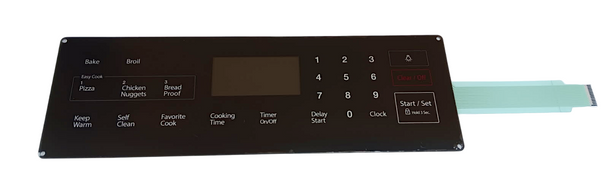
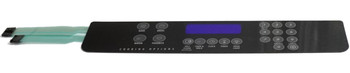
Range Membrane Switch, Touchpad Overlay for Samsung, AP5800759, DG34-00025A
- SKU:
- DG34-00025ACM
- UPC:
- 810032865467
- MPN:
- DG34-00025A
- Condition:
- New
- Availability:
- Restocking Frequently – Order Now Before It’s Gone
%20(1)__86247.1763137691.png?c=2?imbypass=on "Range Membrane Switch, Touchpad Overlay for Samsung, AP5800759, DG34-00025A")
__68123.1763137692.png?c=2?imbypass=on "Range Membrane Switch, Touchpad Overlay for Samsung, AP5800759, DG34-00025A")
__55209.1763137692.png?c=2?imbypass=on "Range Membrane Switch, Touchpad Overlay for Samsung, AP5800759, DG34-00025A")
__74157.1763137693.png?c=2?imbypass=on "Range Membrane Switch, Touchpad Overlay for Samsung, AP5800759, DG34-00025A")
__55162.1763137693.png?c=2?imbypass=on "Range Membrane Switch, Touchpad Overlay for Samsung, AP5800759, DG34-00025A")
__22550.1763137693.png?c=2?imbypass=on "Range Membrane Switch, Touchpad Overlay for Samsung, AP5800759, DG34-00025A")
%20(1)__86247.1763137691.png?c=2 "Range Membrane Switch, Touchpad Overlay for Samsung, AP5800759, DG34-00025A")
__68123.1763137692.png?c=2 "Range Membrane Switch, Touchpad Overlay for Samsung, AP5800759, DG34-00025A")
__55209.1763137692.png?c=2 "Range Membrane Switch, Touchpad Overlay for Samsung, AP5800759, DG34-00025A")
__74157.1763137693.png?c=2 "Range Membrane Switch, Touchpad Overlay for Samsung, AP5800759, DG34-00025A")
__55162.1763137693.png?c=2 "Range Membrane Switch, Touchpad Overlay for Samsung, AP5800759, DG34-00025A")
__22550.1763137693.png?c=2 "Range Membrane Switch, Touchpad Overlay for Samsung, AP5800759, DG34-00025A")
Description
Range Oven Membrane Switch / Touchpad Overlay | Replaces Samsung® DG34‑00025A | 22‑Button Black Panel
Restore full oven control functionality with this brand‑new Choice Manufactured Parts membrane switch (DG34‑00025ACM). Designed as a direct replacement for Samsung® part DG34‑00025A, this black 22‑button touchpad overlay provides responsive input and reliable operation. Intended for use with DE92‑02588G control boards.
Features & Benefits:
- OEM‑style 22‑button membrane switch / touchpad overlay
- Black finish matches original Samsung® design
- ⚙️ Provides accurate, responsive button input
- Designed for use with DE92‑02588G controllers
- Durable adhesive backing for secure mounting
- Condition: Brand New – Unused
Replaces Part Numbers:
AP5800759, PS8764897, DG34‑00025A
Direct replacement for Samsung® membrane switch DG34‑00025A.
✅ Fits Range / Oven Models:
Compatible with select Samsung® ranges using membrane switch DG34‑00025A and controller DE92‑02588G.
Please verify your model number before ordering.
Common Fixes:
- ❌ Unresponsive or intermittent touchpad buttons
- ⚠️ Oven not starting due to failed keypad input
- Replacing a cracked, peeling, or worn membrane overlay
- Missing or damaged adhesive backing causing poor contact
️ Installation Tips:
- Disconnect power before servicing the control panel
- Remove control panel assembly to access old membrane switch
- Clean surface thoroughly before applying new overlay
- Align ribbon connector carefully with controller port
- Test keypad functions before fully reassembling the range
Restore smooth, responsive oven control with this OEM‑fit membrane switch replacement.
Related Products
Related Products

Range Membrane Switch, Touchpad Overlay for Samsung, AP5578468, DG34-00017A
Parts for Samsung


Range Membrane Switch, Touchpad Overlay for Samsung, AP5967636, DG34-00030A
Parts for Samsung

Range Membrane Switch, Touchpad Overlay for Samsung, AP5623392, DG34-00020A
Parts for Samsung

Range Membrane Switch, Touchpad Overlay for Samsung, AP5986689, DG34-00027B
Parts for Samsung
Range Membrane Switch, Touchpad Overlay for Whirlpool, AP6017095, W10207928
Parts for Whirlpool